What's new

UPDATES

Bug fixes, new features, and announcements from the StageDeck team. We ship fast and tell you about it.

šŸš€ FEATUREJune 13, 2026

Your account, your call

What changed

Two new options at the bottom of your Billing page: download a copy of all your StageDeck data, and delete your account.

What was happening

Nothing was broken — these just didn't exist. You can now export everything you've made (scripts, cue lists, runsheets, soundboards, productions) as a single file, any time. And if you ever want to leave, you can delete your account yourself. Fair warning: deletion is immediate and permanent, so grab your data first.

šŸ› BUG FIXJune 12, 2026

Password resets, better security, and a fix for verification emails

What changed

Three things in one update. There's now a "Forgot password?" link on the sign-in page — enter your email, get a reset link, done in about a minute. We fixed the "Resend Verification Email" button, which wasn't actually sending emails. And we tightened up account security behind the scenes, including protection against repeated failed login attempts.

What was happening

A forgotten password used to mean contacting us and waiting for a manual reset — now you can do it yourself any time. Separately, if your verification email went missing, clicking resend looked like it worked but nothing arrived; that's fixed. Verification links also now properly expire after 24 hours like they were always supposed to, and reset links expire after an hour.

šŸš€ FEATUREJune 8, 2026

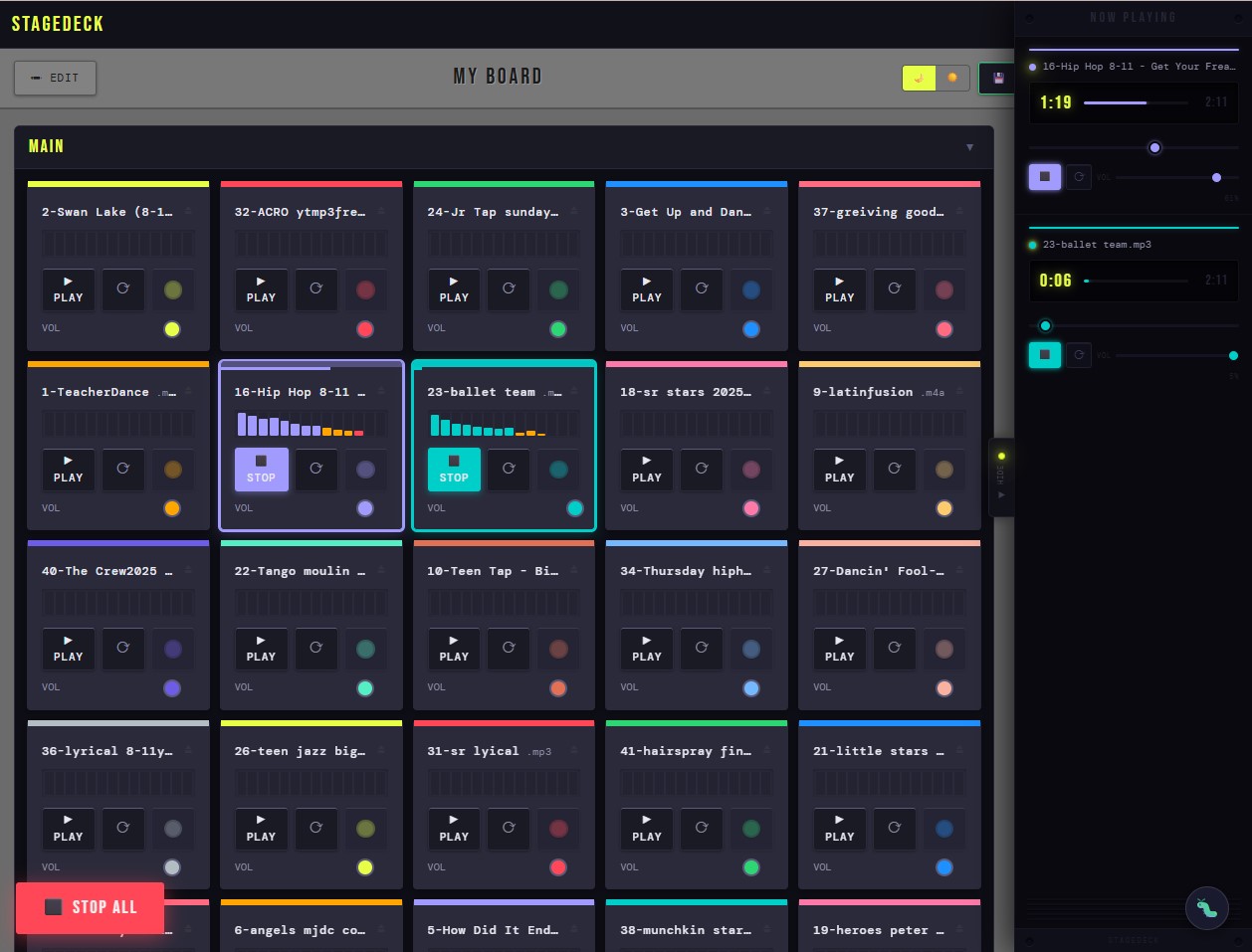
Now Playing: Real-Time Transport Controls for Your Soundboard

Now Playing: Real-Time Transport Controls for Your Soundboard

If you've ever fired a music track, killed it early to skip a line flub, and then scrambled to find where you left off — this one's for you.

StageDeck's soundboard now has a Now Playing panel. It lives on the right edge of the screen as a small pull-out tab. When audio is playing, the tab pulses yellow to let you know it's there. Click it and the panel slides open.

Inside, you get a live readout for every sound currently playing: the filename, a running clock showing minutes and seconds in and total duration, a progress bar, and a seek scrubber you can drag to jump to any point in the track. Underneath that, the same controls you already know from the card — play/stop, loop toggle, and volume — so you can manage playback without hunting for the original button on a packed board.

The board shifts over when the panel is open so nothing gets covered.

Once a sound stops, its entry stays in the panel for a few seconds before quietly fading out. If you need to restart it, just hit play directly from the panel — no need to find the card.

Multiple tracks playing at once? Each one gets its own row, stacked in the panel in the order they started.

šŸ› BUG FIXMay 28, 2026

Fixed: Email verification link showing "expired" after clicking

What changed

Fixed an issue where clicking the email verification link would show a "Link Expired" error even though the account was being verified correctly behind the scenes.

What was happening

The account was actually being verified correctly, but users had no way of knowing that. They were left staring at an error page with no clear path forward.

šŸ“£ ANNOUNCEMENTMay 22, 2026

We're live!

We're live!

We're live.

After months of building, StageDeck is officially open. If you're reading this, you're one of the first people to find it — and that means a lot to us.

StageDeck started as a personal frustration. Running tech for school productions and community theatre meant juggling a dozen different tools — spreadsheets for runsheets, notes apps for cue lists, voice memos for sound cues. Nothing talked to each other. Nothing was built for the way shows actually get made.

So we built it ourselves.

What's here right now

Soundboard — A touch-optimised sound pad that saves your layouts to the cloud. Organise cards into groups, set per-card volumes, loop tracks, and pick up exactly where you left off on any device.

Cue List — Write and fire cues in sequence during a live show. Label, number, and annotate every cue with tech notes for your whole team.

Script Writer — A block-based script editor with characters, scene headers, stage directions, and cue markers all in one place. Sticky notes on any block. Export directly to your cue list.

Runsheet — A full show-day timeline with a live clock, elapsed timer, role assignments, and one-tap checkoffs for every task from bump-in to pack-down.

And tying it all together — the Show Wizard, which walks you through setting up a full production in minutes.

What we're building next

We're actively adding features based on how real shows get run. On the near-term list:

  • Collaborative editing so your whole tech team can work in the same document
  • Sound cue playback directly from the cue list
  • PDF export for scripts and runsheets
  • Mobile-optimised view for calling cues on a phone or tablet

We want to hear from you

This tool gets better when it's shaped by the people who actually use it. If something doesn't work the way you'd expect, if a feature is missing that would save you time on show night, or if you just want to tell us what you think — we genuinely want to know.

Use the šŸ› button in the bottom-right corner of any page to send us a bug report or feature request. We read every one.

Thanks for being here early. Let's build something great together.

— Mike & the StageDeck team